No Value Column? Here's How to Turn Text Relationships Into a Sankey Diagram
Most Sankey tutorials start the same way: make sure your data has a Source, a Target, and a Value. But a lot of real datasets don't have that third column at all. There's no number to sum, no measure, no total. Just rows of text, where the relationship you actually care about is which categories keep showing up together.
Support ticket logs look like this. So do surveys, application forms, and most CRM exports. One row per event, several text columns, and nothing that looks like a "value" anywhere in sight.
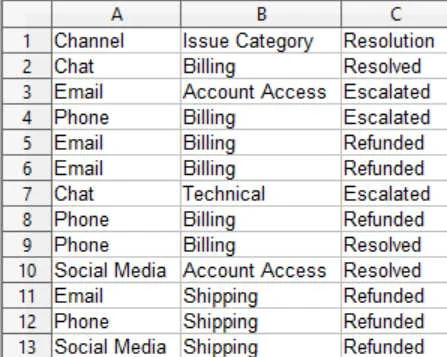
The relationship is hiding in how often things repeat
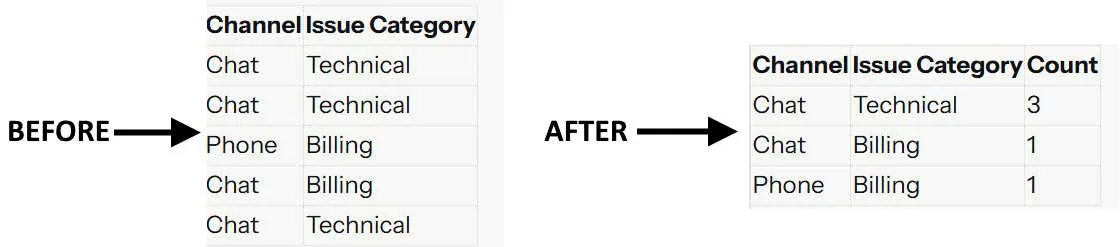
Here's the trick: you don't need a value column if you're willing to count. Every time two categories show up together in the same row, that's one occurrence. Count how often each pairing happens, and that count becomes your value.
Take five raw rows of a support ticket log:
| Channel | Issue Category |
|---|---|
| Chat | Technical |
| Chat | Technical |
| Phone | Billing |
| Chat | Billing |
| Chat | Technical |
Nothing in that table looks like a Sankey diagram. But count the pairings, and a shape appears:
| Channel | Issue Category | Count |
|---|---|---|
| Chat | Technical | 3 |
| Chat | Billing | 1 |
| Phone | Billing | 1 |
That count column is your value. It didn't exist in the original data. It came from the data.
Letting Data Explorer do the counting for you
You could build that count table by hand for a small example. Real datasets have thousands of rows and several candidate columns, and it's not always obvious which columns actually belong together as a flow. That's what SankeyBuilder's Data Explorer is for.
Point Explore at a dataset with no value column, and it recognizes there's nothing to sum, then falls back to counting row occurrences automatically. It also looks at your other columns and proposes a few different ways to chain them into stages, so instead of guessing which combination tells the best story, you're picking from real, already-counted options.
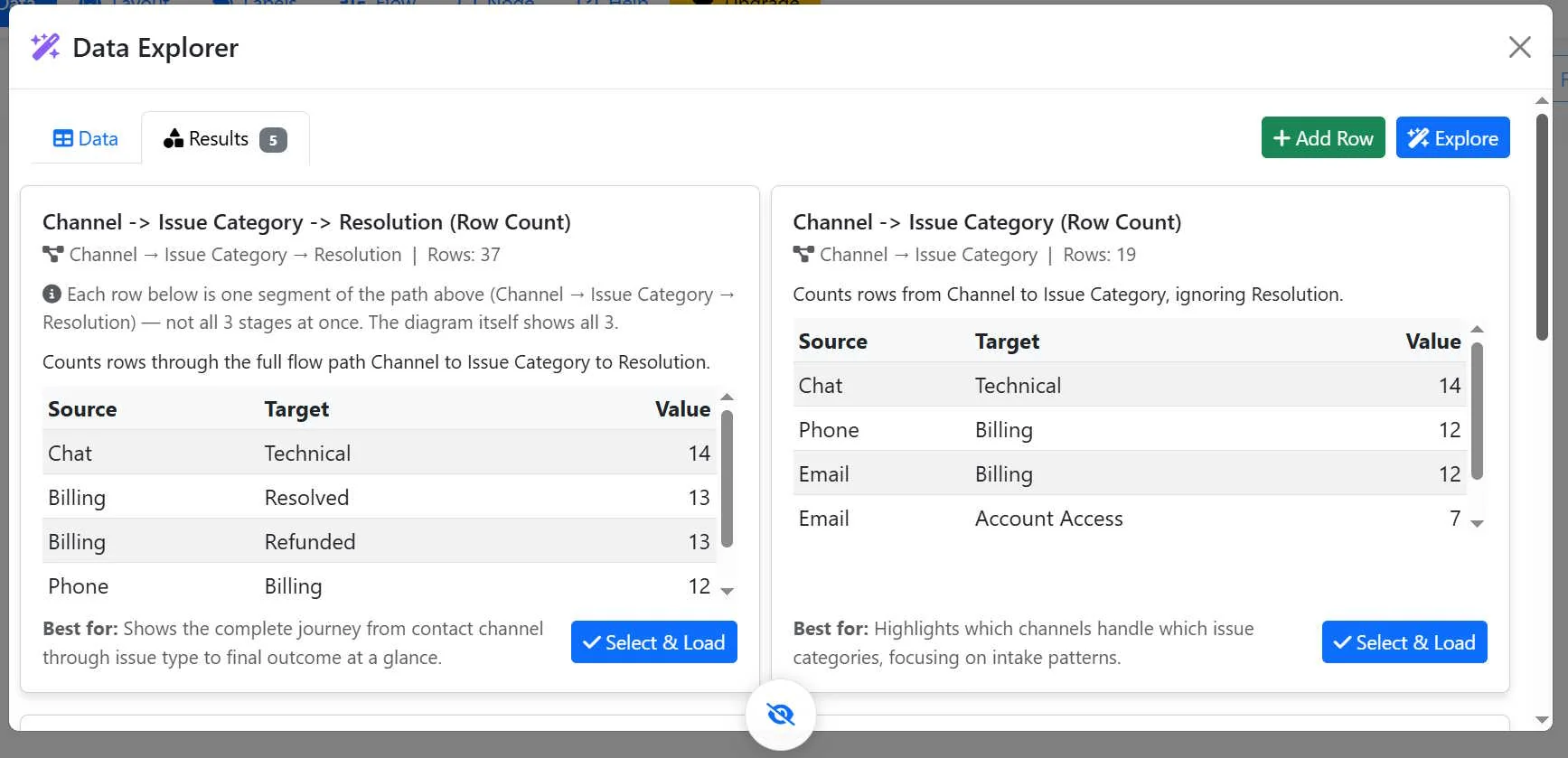
Pick the variant that matches the story you're trying to tell, and the diagram builds itself from there, same as if you'd had a value column all along.
Try it yourself
Attached to this post is a real demo dataset: 90 rows of a support ticket log, three columns, no value anywhere. Channel (Email, Chat, Phone, Social Media), Issue Category (Billing, Technical, Account Access, Shipping, Product Defect), and Resolution (Resolved, Escalated, Refunded, Pending).
Download: support_tickets_demo.csv
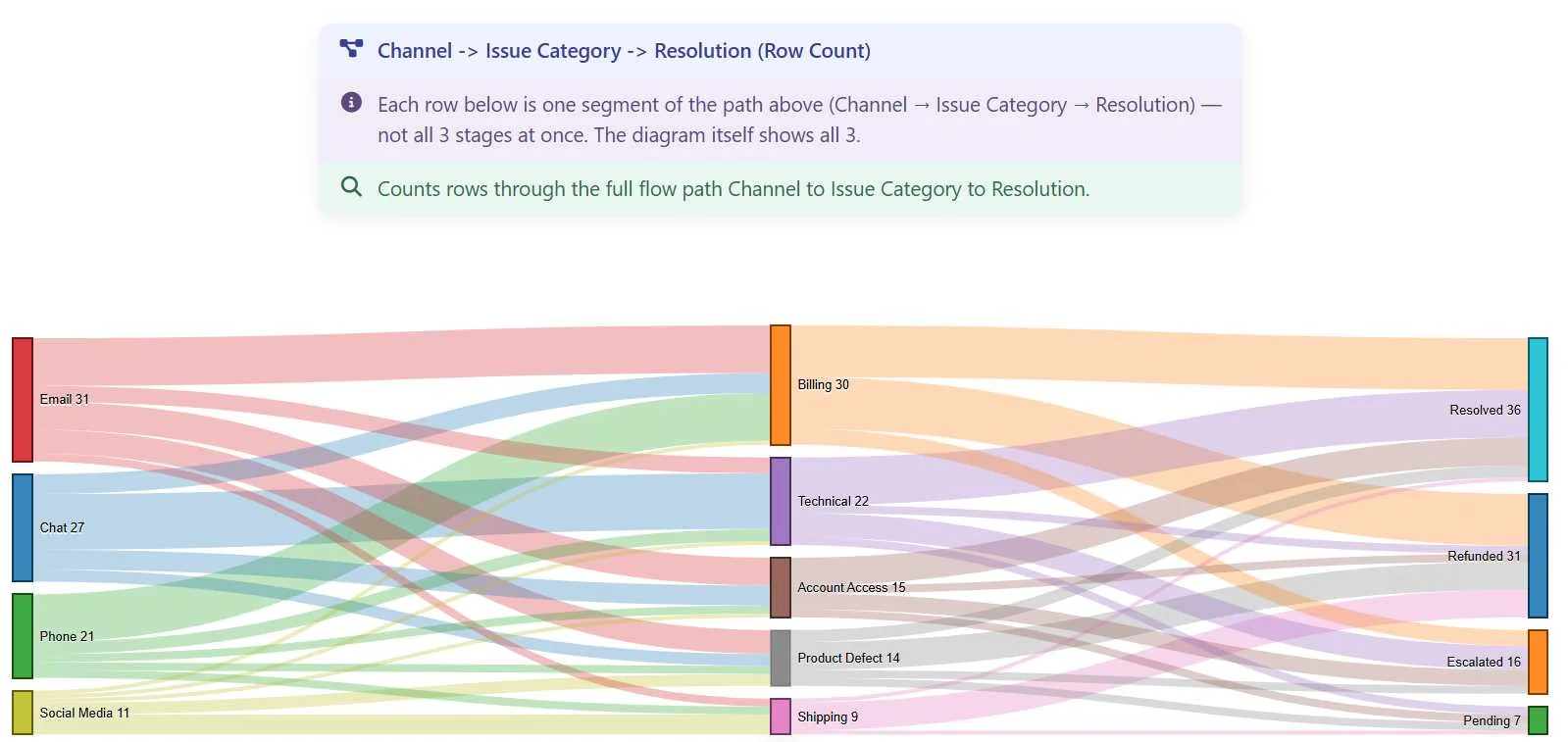
Upload it into SankeyBuilder. Selec the Explore button in the Data tab and then select Explore, and let it count. You'll end up with datasets that makes something obvious that was completely invisible in the raw rows: Chat tickets are overwhelmingly Technical issues, Phone tickets skew heavily toward Billing, and Billing issues split almost evenly between Resolved and Refunded. None of that is written anywhere in the data. It only exists once you count.
From counted relationships to a slide deck people actually understand
Once you've got that diagram, you're not done, you're set up for the next step. Visual Prompts takes the same flow you just built (still Source, Target, Value, it just doesn't care that the value came from a count instead of a spreadsheet column) and turns it into a full set of AI-image-generation prompts, one slide per relationship.
Select Visualize on the Data tab. Select a style and then Generate.
Every entity gets one locked visual description reused across every slide it appears in. "Chat" always looks like the same chat bubble icon. "Billing" always looks like the same invoice graphic. "Refunded" always looks like the same return-arrow icon. The counted relationship between them, the actual number of tickets, shows up as bold on-image text.
The following is an Overview Slide based on the Channel -> Issue Category -> Resolution (Row Count) dateset (shown above). I selected Top 5 for the slide deck and the Corporate Clean style:
This is the first slide. Notice how entities have a similar look:
The two features are built to hand off to each other this way on purpose. Explore turns text relationships into something countable. Visualizer turns something countable into something a room full of people can actually look at and understand in five seconds, without anyone needing to explain what the number in the corner means.
Try it
If your data doesn't have a value column, that's not a dead end, it's just a dataset you haven't counted yet.
Discussion